

Azure OpenAI o1, o3 and o4-mini Retire November 19, and gpt-4o Follows December 9: List Your Models With One API Call

If an application of yours calls an Azure OpenAI deployment of o1, o3, o3-mini or o4-mini, the clock is short. In the model catalog of my Azure subscription all four show an inference retirement date of November 19, 2026, which is 28 days from today. The gpt-4o version 2024-05-13 follows on December 9, 2026. After retirement, Microsoft says that every inference request returns 410 Gone.
You do not have to trust a blog post for this. Azure publishes the dates in an API, and one call lists every model with its lifecycle status and retirement date for a region. This post gives you that call as a short script, shows what it returned for my subscription in two regions, and explains the naming trap that makes the API say the opposite of the documentation.
Quick guide
- List the models of your region with the Models API (script below).
- Match them against your deployments. Compare the model name and version, not only the name.
- Read the status with the API naming in mind.
Deprecatingin the API means “deprecated, still works, closed to new customers” in the docs. - Pick a target and set the upgrade option so that a Standard deployment does what you expect on the day.
Step 1: one call lists every retirement date
The Models API is subscription scoped and returns every model in a region with lifecycleStatus and deprecation.inference (see the Microsoft reference). The script keeps only OpenAI models that are not generally available, sorts by date and adds the days left. It needs a bearer token for the Azure Resource Manager. Get one with az account get-access-token --resource https://management.azure.com --query accessToken -o tsv and put it in ARM_TOKEN. I ran it with a service principal token, because the Azure CLI is not installed on my small server, so the az token step is from the documentation and untested here.
import datetime, json, os, sys, urllib.request

sub, region = sys.argv[1], sys.argv[2]
url = (f"https://management.azure.com/subscriptions/{sub}/providers/"
       f"Microsoft.CognitiveServices/locations/{region}/models?api-version=2024-10-01")
req = urllib.request.Request(url, headers={"Authorization": "Bearer " + os.environ["ARM_TOKEN"]})
rows = set()
for m in json.load(urllib.request.urlopen(req))["value"]:
    mm = m["model"]
    if mm["format"] == "OpenAI" and mm.get("lifecycleStatus") in ("Deprecating", "Legacy"):
        rows.add((mm.get("deprecation", {}).get("inference", "-")[:10], mm["name"], mm["version"], mm["lifecycleStatus"]))
today = datetime.date.today()
print(f"{'retires':<11}{'days':>5}  {'model':<13}{'version':<12}API status")
for r in sorted(rows):
    days = (datetime.date.fromisoformat(r[0]) - today).days
    print(f"{r[0]:<11}{days:>5}  {r[1]:<13}{r[2]:<12}{r[3]}")
export ARM_TOKEN=<token>
python3 models.py <subscription-id> uksouth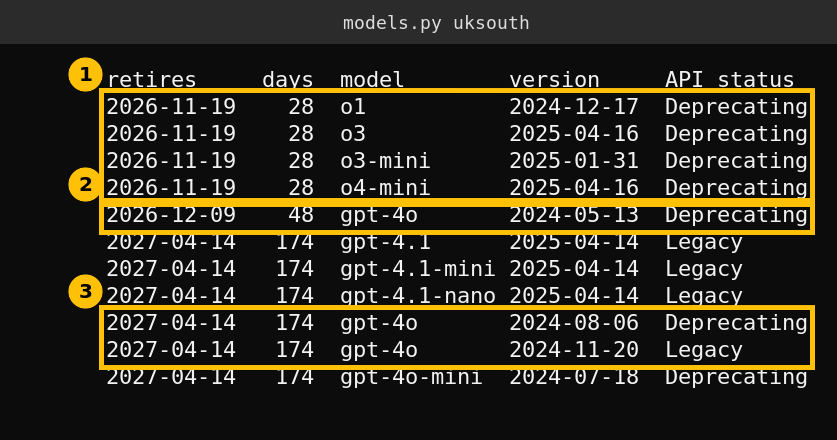
Three things stand out. The four reasoning models o1, o3, o3-mini and o4-mini all retire on the same day, 2026-11-19. The oldest gpt-4o version (2024-05-13) retires on 2026-12-09. The newer gpt-4o versions, gpt-4o-mini and the gpt-4.1 family are listed to 2027-04-14.
The dates depend on the region
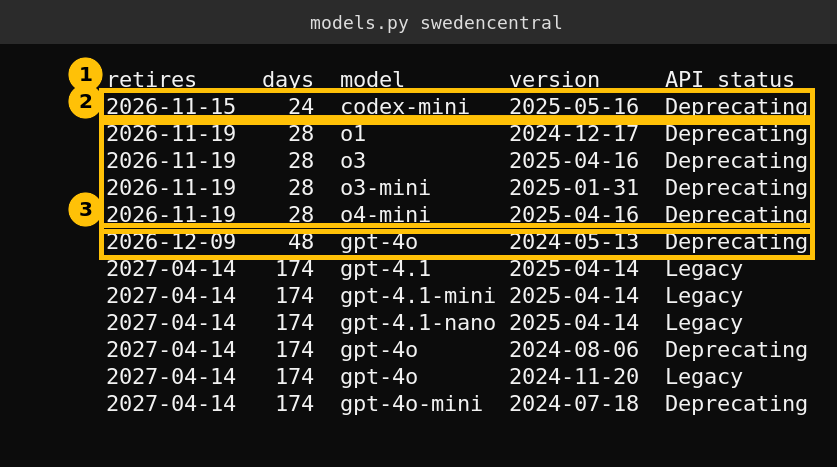
I ran the same script for Sweden Central. The list is almost the same, but it has one extra row, codex-mini, retiring on 2026-11-15, four days before the others. A model that does not exist in one region has no date there, so always run the call for the regions where you actually deploy.
The naming trap: the API says Deprecating, the docs say Deprecated
The Microsoft lifecycle article defines five stages: Preview, Generally Available, Legacy, Deprecated and Retired. A Deprecated model still works for existing customers and is closed to new ones. A Retired model is removed and returns 410 Gone. The API uses different words for the same states, and the article warns about it.
| Stage in docs and portal | API lifecycleStatus | What it means |
|---|---|---|
| Generally Available | GenerallyAvailable | Works, new deployments allowed |
| Legacy | Legacy | Works, newer models exist, new deployments still allowed until deprecation |
| Deprecated | Deprecating | Works for existing customers, closed to new customers |
| Retired | Deprecated | Removed, inference returns 410 Gone |
So in my output, Deprecating is the docs stage Deprecated, not an error. The word Deprecated in the API column would mean the model is already gone. If your own checks alert on the word “Deprecated”, they alert on the wrong state. The article also says to compare deprecation.inference with today, because the status field can lag.
What happens on the day
- Standard, Global Standard and Data Zone Standard deployments are upgraded automatically, region by region. The Learn article gives one example: when gpt-4o 2024-05-13 retires on 2026-12-09 it is upgraded to
gpt-5.6-sol. It also says the replacement can change before the date, so check the retirement schedule. - Provisioned deployments are not upgraded. You migrate them yourself, either in place or side by side.
- You control the behaviour with the
versionUpgradeOptionproperty on the deployment:OnceNewDefaultVersionAvailable,OnceCurrentVersionExpiredorNoAutoUpgrade. WithNoAutoUpgradethe deployment stops working at retirement. - Dates are not extendable. The article says so in its FAQ.
- Fine-tuned models follow their own schedule. The article lists deployment retirement for fine-tuned gpt-4o 2024-08-06 and gpt-4o-mini at 2027-10-01 and for o4-mini at 2027-10-16.
An automatic upgrade swaps the model under your prompts, which can change output format, length, latency and cost. Test the replacement in a copy of your deployment before the date and decide the target yourself. Microsoft names the official replacement roughly 90 to 120 days before retirement, and says you do not have to wait for it.
A short checklist for this week
- Run the script for every region you deploy in.
- List your deployments and write the model and version next to each one.
- For the November 19 group, test a replacement now, because that is 28 days away.
- Set
versionUpgradeOptiondeliberately on each Standard deployment. - Plan the manual migration for any Provisioned deployment.
- Subscribe to Service Health alerts for the Azure OpenAI Service. Microsoft sends retirement notices at least 60 days ahead to subscription owners with active deployments.
Caveats
I ran the script against the catalog only. My subscription has no OpenAI deployments, so I did not test an upgrade, a retirement or a 410 response. The catalog shows model-level dates, and Microsoft also publishes per-SKU dates that I did not compare. Two regions are not the whole world, so run it for yours.
FAQ
When do o1, o3, o3-mini and o4-mini retire on Azure OpenAI?
In my subscription catalog all four show an inference retirement date of November 19, 2026, in both UK South and Sweden Central.
When does gpt-4o retire?
Version 2024-05-13 retires on December 9, 2026. Versions 2024-08-06 and 2024-11-20, and gpt-4o-mini 2024-07-18, show April 14, 2027 in the catalog I queried.
What does Deprecating mean in the Azure OpenAI Models API?
It means the model still works for existing customers and is closed to new ones. In the Microsoft docs that stage is called Deprecated. The API value Deprecated means the model is retired.
What happens to my deployment when the model retires?
Standard type deployments are upgraded automatically to the replacement unless you set NoAutoUpgrade, and Provisioned deployments are not upgraded. Inference to a retired model returns 410 Gone.
Can Microsoft extend a model retirement date?
The Microsoft article says retirement dates are not extendable.